Google AI Mode vs. AI Overviews: How Citations and Fan-Out Differ
Compare Google AI Overviews and AI Mode: when each appears, how query fan-out and citations differ, and what Search Console can and cannot report.
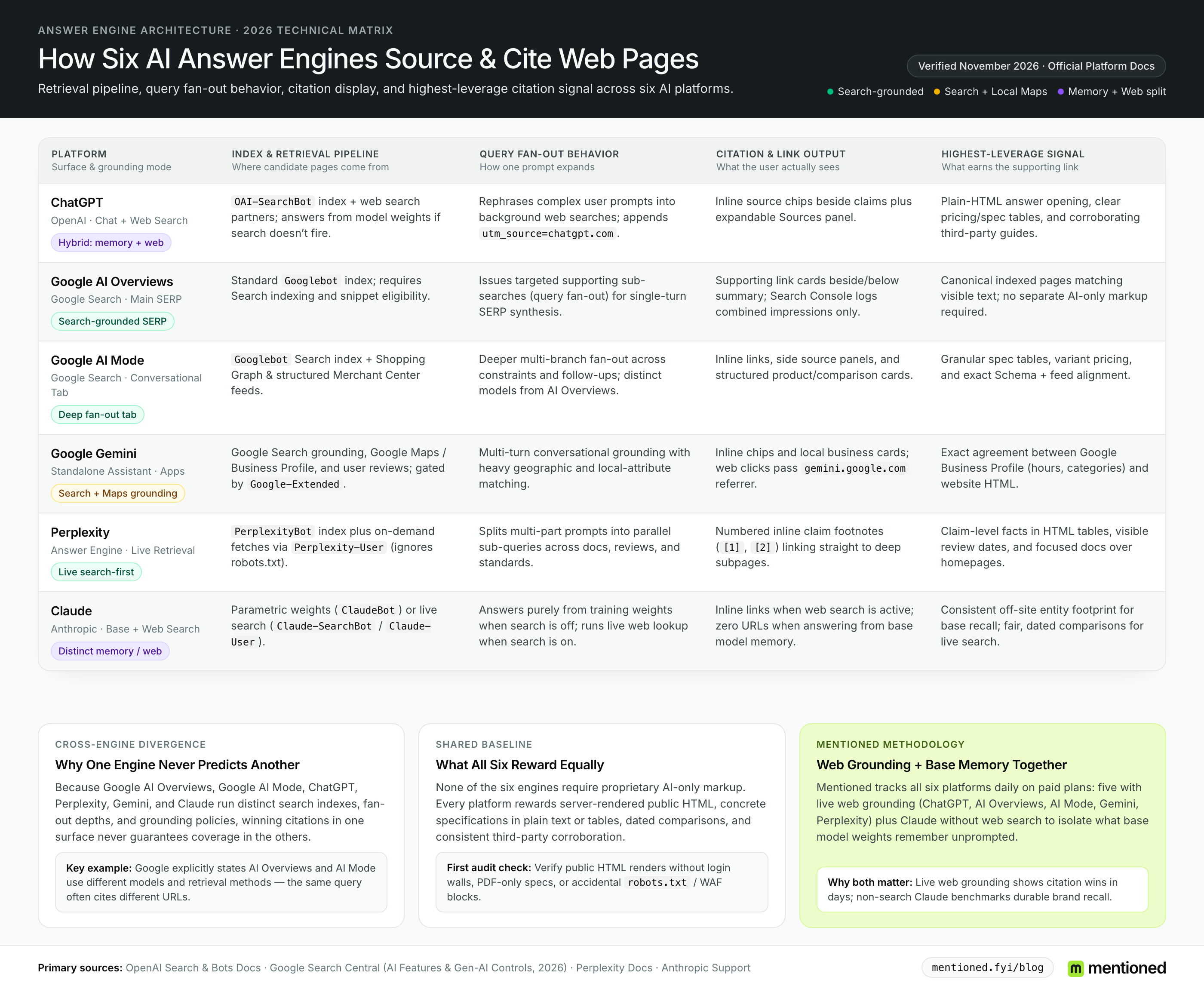
Reference ChartVerified November 2026 from official OpenAI, Google Search Central, Perplexity, and Anthropic platform documentation. Free to save or cite with attribution.
Suppose you run an online cookware store and a shopper searches Google for “best stainless steel sauté pan for induction under €150.” On the main Search results page, an AI Overview gives a short summary of clad stainless steel construction and links three general buying guides. When that same shopper switches to Google AI Mode and asks a follow-up—“which of those have oven-safe lids and flared pouring rims?”—AI Mode returns a structured product breakdown, shopping cards, and links to specific technical spec pages.
Same search engine, same product category, two noticeably different sets of cited sources. Treating “Google AI” as a single surface hides why a page earns links in one experience and disappears in the other.
Why Google Treats AI Overviews and AI Mode Differently
In Google Search Central’s AI features documentation, Google explicitly notes that AI Overviews and AI Mode can use different models, retrieval methods, and ranking approaches. Even when you enter the exact same wording in both surfaces, you should not expect identical summaries or identical supporting links.
The difference starts with how each feature fits into the search journey:
- AI Overviews appear automatically at the top of the standard Google Search results page when Google’s systems determine a concise AI summary adds value alongside ordinary web links. They target quick synthesis—giving the searcher an answer and a compact group of supporting pages.
- AI Mode is a dedicated conversational tab built for longer, multi-constraint, and exploratory questions. Users can ask multi-part queries up front, inspect richer comparison tables or product cards, and refine their criteria over several follow-up turns without starting over.
Because AI Overviews sit inside a single SERP turn while AI Mode supports extended research, the evidence needed to support each answer shifts. Our guide to how Google AI Overviews choose sources covers baseline Search eligibility; comparing both features side by side clarifies what changes once a buyer enters AI Mode.
Side-by-Side Comparison: AI Overviews vs. AI Mode
The table below summarizes the practical differences that affect content planning, technical checks, and measurement:
| Dimension | Google AI Overviews | Google AI Mode |
|---|---|---|
| Where It Appears | Automatically inside the main Google Search results page | Dedicated AI Mode tab inside Google Search |
| Typical User Behavior | Single-turn informational or quick comparison queries | Complex, multi-constraint, and multi-turn follow-up research |
| Query Fan-Out Depth | Issues supporting sub-searches to verify core claims | Runs broader and deeper fan-out across sub-questions and follow-ups |
| Shopping and Product Elements | Primarily text summaries with supporting links | Frequently blends web citations with rich product comparisons and shopping cards |
| Technical Eligibility | Standard Google indexing and snippet eligibility | Standard Google indexing and snippet eligibility (no separate AI markup) |
| Opt-Out Control | Search Console Settings → Search generative AI and snippet controls (nosnippet, max-snippet, data-nosnippet) |
Covered by the same Search Console Settings → Search generative AI and snippet controls |
| Search Console Reporting | Combined impressions only in the Generative AI performance report | Combined impressions only in the Generative AI performance report |
Notice the control overlap: under Google’s generative AI controls, excluding a property via Settings → Search generative AI removes links and grounding across AI Overviews, AI Mode, and generative features in Discover together while preserving standard Search eligibility. You cannot opt out of AI Mode separately from AI Overviews at the property level.
How Query Fan-Out Widens the Citation Pool in AI Mode
Both AI Overviews and AI Mode use a technique Google calls query fan-out: breaking one user question into several related background searches across subtopics and data sources before assembling the final answer. For a deeper walkthrough of how sub-query expansion works, read query fan-out explained.
In AI Mode, fan-out typically goes much further because users ask more layered questions and add follow-up constraints. Consider our hypothetical cookware buyer asking about induction sauté pans under €150 with oven-safe lids and flared rims. Behind the scenes, AI Mode may fan out into distinct sub-questions:
- Which stainless steel sauté pans use a magnetic 18/0 or tri-ply induction-compatible base?
- What is the maximum oven-safe temperature for glass lids versus stainless steel lids on each model?
- Which pans explicitly specify a flared or dripless pouring rim?
- What are current European retail prices, stock status, and warranty terms?
A broad roundup post that lists “five great pans” without exact lid temperature ratings or base materials might appear in a short AI Overview, yet fail to substantiate any of the deeper AI Mode follow-ups. Meanwhile, a merchant product page or buying guide that publishes clear technical tables—base alloy, induction disc diameter, oven temperature rating with and without lid, rim design, and verified European pricing—gives AI Mode verifiable evidence to cite across several fan-out branches.
For retail and e-commerce brands, AI Mode also relies heavily on clean product feeds and structured data alongside web pages. Make sure your visible product copy, Schema.org product markup, availability, and Merchant Center data agree on every variant. A price or specification mismatch between structured data and visible HTML can disqualify a product card or produce conflicting claims in a comparison table.
What Search Console Can and Cannot Tell You
Google’s Generative AI performance report (Search) gives site owners an official starting point for measuring presence in Search generative features, but its limits are strict and easy to misread:
- Impressions only: The report displays impressions for links shown inside covered generative features. Clicks, click-through rate, and average position are not broken out in this view.
- No query breakdown: You can group impressions by page, country, device, or date, but you cannot see which exact prompt triggered an impression.
- No split between AI Overviews and AI Mode: Impressions from AI Overviews and AI Mode are aggregated together, so you cannot tell from Search Console alone which surface drove a gain or drop.
- No answer context: Search Console cannot tell you whether your brand was recommended first, mentioned neutrally, described inaccurately, or outranked by three competitors inside the same answer.
Treat Search Console’s generative AI impressions as directional confirmation that a URL appeared in Google’s AI surfaces—never as a substitute for inspecting actual answers. Keep Search Console impressions, prompt-level observations, and site analytics in separate series as outlined in our AI visibility metrics guide.
Why Tracking Both Surfaces Separately Matters
Because AI Overviews and AI Mode use different retrieval patterns and serve different stages of buyer research, monitoring only one of them creates blind spots:
- A brand with strong broad informational guides may win citations in AI Overviews on top-of-funnel queries while disappearing in AI Mode when buyers ask about pricing tiers, technical specs, or regional alternatives.
- A specialist vendor or retailer with detailed specification pages may show up inside AI Mode fan-out comparisons even on categories where short queries rarely trigger an AI Overview—or where big media publishers dominate the main SERP.
Mentioned tracks Google AI Overviews and Google AI Mode as two separate platforms every day on all paid plans—starting at €29/month on Starter (1 brand, 25 questions, 2 markets, excluding VAT)—alongside ChatGPT, Gemini, Perplexity, and Claude. Each run captures brand mentions, position, sentiment, competitor share of voice, cited URLs, and query fan-out sub-queries so your team can compare exactly where your pages appear in AI Overviews versus AI Mode. If you want to test AI visibility tracking before upgrading, Mentioned’s Free plan tracks 1 brand and 5 questions weekly on ChatGPT with no card required. Compare plans on the Mentioned pricing page.
How to Prepare One Page for Both Google Surfaces
You do not need separate pages for AI Overviews and AI Mode. Structure high-priority pages so they serve both quick synthesis and deep follow-up verification:
- Confirm core Search eligibility first: Check URL Inspection in Search Console for indexing, canonical selection, and snippet eligibility—and confirm your property is not excluded under Settings → Search generative AI.
- Lead with a concise, plain-language summary: Put the direct answer and decision criteria near the top so AI Overviews can ground a clean summary without misquoting context.
- Add verifiable detail for deeper fan-out: Include labeled specification tables, exact compatibility conditions, pricing ranges, warranty rules, and clear exceptions to answer the follow-up constraints AI Mode looks for.
- Keep structured data and feeds aligned with visible copy: Verify that product attributes, pricing, and availability match across HTML, structured data, and shopping feeds.
- Record observations separately by surface: When testing a set of customer questions manually or automatically, log AI Overviews and AI Mode in distinct columns alongside market, language, and cited URLs before deciding what to edit.
Frequently Asked Questions
Can a Page Appear in AI Overviews but Miss AI Mode?
Yes. Google notes that AI Overviews and AI Mode can use different models and retrieval methods, and AI Mode often runs deeper query fan-out across multi-part or conversational follow-up questions.
Does Search Console Separate AI Overviews From AI Mode?
No. Search Console's Generative AI performance report combines impressions across covered Search generative features and lets you group by page, country, device, or date—not by individual feature or query.
Do I Need Separate Technical Markup for Google AI Mode?
No. Google states that no special AI-only markup is required for either feature. Standard Search indexing, snippet eligibility, and accurate structured data matching visible text apply to both.
Free AI Visibility Tracking Sheet (CSV and Print Guide)
Download the ready-to-use run sheet with columns for Mention Rate, Citation Rate, Share of Voice, sentiment, and accuracy — or subscribe for new guides and templates.
Check Your AI Visibility
Start free with 5 ChatGPT questions weekly in Mentioned, or test which AI crawlers your website allows.