How to Track AI Referral Traffic in GA4
Set up a custom AI Assistants channel group and GA4 Exploration report with tested regex—plus understand the dark-traffic blind spots GA4 misses.
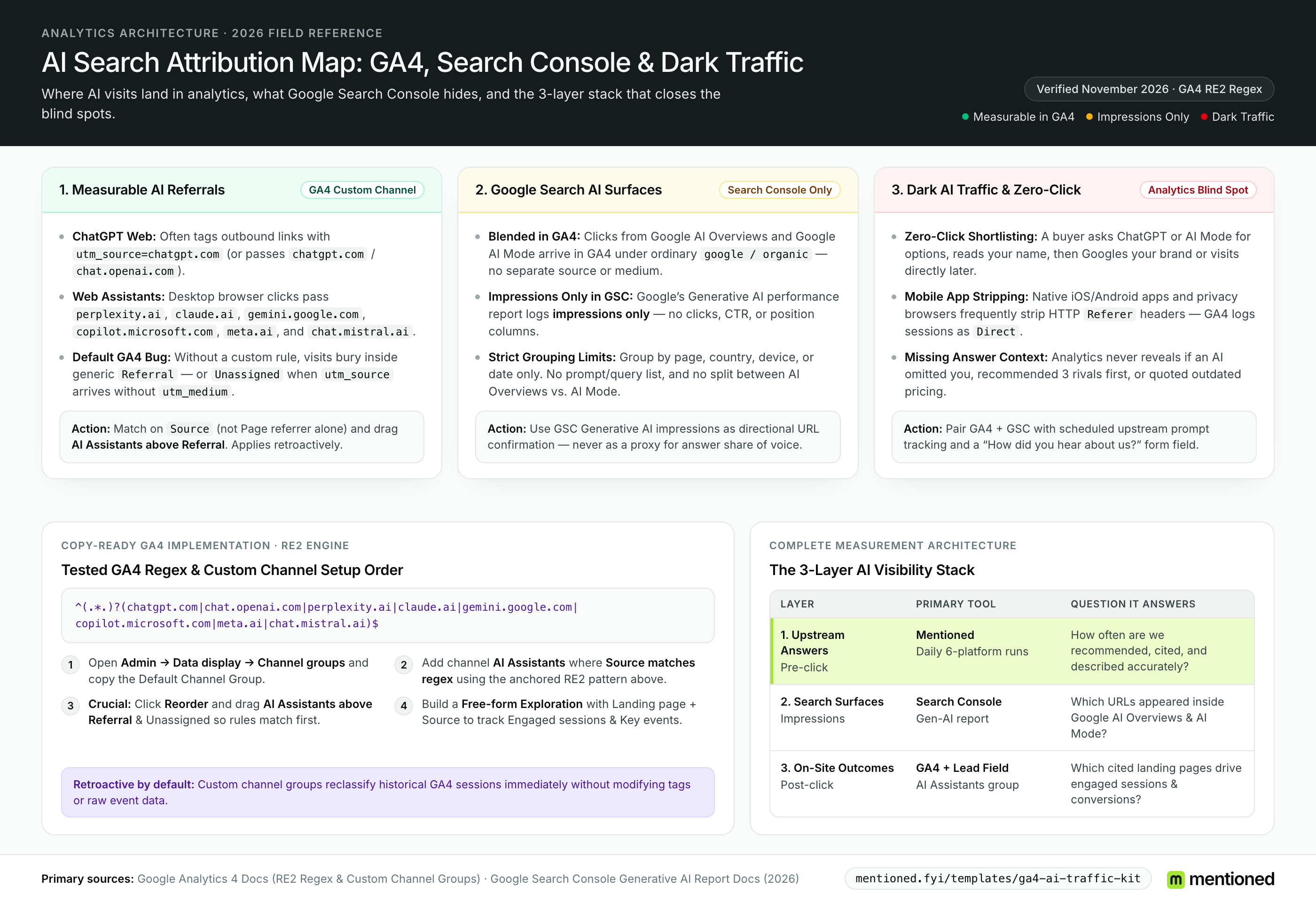
Reference ChartVerified November 2026 against Google Analytics 4 RE2 regex and Google Search Console Generative AI reporting documentation. Free to download or embed with attribution.
Open Google Analytics 4 after publishing a wave of product guides and check Traffic acquisition. You may spot engaged sessions arriving straight onto deep documentation pages—some labeled chatgpt.com / referral, a handful from perplexity.ai / referral, and others scattered into Unassigned or Direct. By default, GA4 has no dedicated channel for AI assistants, so attributable clicks stay buried inside generic Referral rows unless you group them intentionally.
Setting up a custom AI Assistants channel group and landing-page Exploration takes about ten minutes, applies retroactively to past data, and gives you a clean baseline for every AI visit GA4 can actually attribute.
Which AI Assistant Domains and UTMs Appear in GA4
AI assistants send referral clicks from distinct domains, and ChatGPT also frequently appends utm_source=chatgpt.com to outbound citation links. When utm_source=chatgpt.com arrives without a matching utm_medium, GA4 can classify the session as Unassigned in the Default Channel Group unless a custom rule catches it first.
Start by tracking these core assistant hostnames in your GA4 rules:
| AI Assistant | Session Source Domains to Match | Attribution Notes in GA4 |
|---|---|---|
| ChatGPT | chatgpt.com, chat.openai.com |
Often appends utm_source=chatgpt.com, which preserves the source even if the HTTP referrer is stripped. |
| Perplexity | perplexity.ai |
Typically arrives as perplexity.ai / referral (including subdomains). |
| Claude | claude.ai |
Arrives as claude.ai / referral from web-grounded citations and shared links. |
| Google Gemini | gemini.google.com |
Captures clicks from the standalone Gemini web app, not Google AI Overviews. |
| Microsoft Copilot | copilot.microsoft.com |
Captures clicks from Copilot web responses. |
| Meta AI | meta.ai |
Captures clicks from Meta AI’s web interface. |
| Mistral Le Chat | chat.mistral.ai |
Captures clicks from Mistral’s Le Chat web interface. |
Matching on Source (rather than Page referrer alone) ensures you capture both referrer-based clicks and UTM-tagged visits like utm_source=chatgpt.com in a single rule.
Tested GA4 Regex for AI Assistant Traffic
GA4 uses Google’s RE2 regular expression engine, documented in Google Analytics 4 regular expressions. Use this anchored expression to match exact assistant domains and their subdomains without accidentally catching unrelated lookalike domains:
^(.*\.)?(chatgpt\.com|chat\.openai\.com|perplexity\.ai|claude\.ai|gemini\.google\.com|copilot\.microsoft\.com|meta\.ai|chat\.mistral\.ai)$Why this pattern is safe and clean:
- The anchors
^and$require the full source string to match. - The optional
(.*\.)?prefix matches both the apex domain (perplexity.ai) and any subdomain (www.perplexity.ai) while enforcing a dot boundary so domains likenotmeta.aiorfakechatgpt.comdo not match. - Every literal dot inside a domain name is escaped (
\.). - Standard GA4 referral hostnames are lowercase; if you expect mixed-case manual UTMs, select case-insensitive matching where available or prefix the pattern with
(?i).
Step-by-Step: Create an AI Assistants Custom Channel Group
Custom channel groups are retroactive and non-destructive, as documented in Google’s custom channel groups guide. Follow these steps inside your GA4 property:
- Open Admin → Data display → Channel groups.
- Click Create new channel group (or copy the Default Channel Group so Organic Search, Paid Search, Email, and Direct stay intact). Name it something clear, such as
Default + AI Assistants. - Click Add new channel and name it AI Assistants.
- Under Channel conditions, click Add condition group, choose Source, select matches regex, and paste the tested regex above.
- Click Save channel, then click Reorder at the top of the channel list.
- Drag AI Assistants above Referral (and above Organic Social and Unassigned). GA4 evaluates channels from top to bottom and stops at the first match—if Referral stays higher,
perplexity.ai / referralwill never reach your new channel. - Click Apply, then Save group.
To view your new channel immediately in standard reports, open Reports → Acquisition → Traffic acquisition, click the primary dimension dropdown (Session primary channel group), and switch it to your new Default + AI Assistants channel group. For ready-made setup worksheets and audit templates, grab our GA4 AI traffic tracking kit.
Build a Dedicated GA4 Exploration Report for AI Landing Pages
A channel row tells you total volume, not which pages convert. Create a focused Free-form Exploration to see exactly which pages earn clicks from each assistant and what visitors do afterward:
- Open Explore → Blank and name the report
AI Assistants — Landing Pages. - Under Dimensions, import:
Session sourceLanding page + query stringSession custom channel group(selecting yourDefault + AI Assistantsgroup)
- Under Metrics, import:
SessionsEngaged sessionsEngagement rateKey eventsAverage engagement time per session
- Drag
Landing page + query stringinto Rows andSession sourceinto Columns (or as a second row if you prefer a flat table). - Drag your imported metrics into Values.
- Under Filters, add
Session source→ matches regex → paste the exact AI regex above (or filterSession custom channel groupexactly matchesAI Assistants).
Review this report monthly alongside your content calendar. Look for three actionable patterns: deep technical or comparison pages pulling high engagement rates, landing pages with high bounce or low engagement (often outdated docs or mismatched answers), and pages generating qualified key events even at modest session counts.
The Blind Spots GA4 Cannot Measure
A clean GA4 report is useful—as long as nobody mistakes it for total AI impact. Be explicit with stakeholders about four major blind spots built into web analytics:
- App-to-browser referrer stripping: Native mobile AI apps and privacy-focused browsers frequently strip HTTP referrer headers. Unless a parameter like
utm_source=chatgpt.comsurvives the redirect, GA4 records those clicks asDirect. - Google AI Overviews and AI Mode: Clicks from Google’s Search generative features arrive in GA4 as ordinary
google / organictraffic. GA4 cannot separate an AI Overview click from a classic blue-link click; see our guide to Google AI Overviews sources for how Search Console’s separate impressions report works. - Zero-click reading and delayed branded search: Many buyers read a recommendation in Perplexity, ChatGPT, or Claude without clicking a single footnote, then search your company name on Google later that week. GA4 credits the later visit to
google / organicorDirect. - Unlinked mentions and training-knowledge answers: When an assistant names your brand without linking to your domain, GA4 sees zero referral traffic from that exposure.
Because of these blind spots, treat GA4’s AI Assistants channel as a conservative floor for attributable clicks, never as a complete count of AI-influenced pipeline. Our AI visibility metrics guide explains how to keep referral sessions, Search Console impressions, and prompt-level visibility in distinct reporting layers.
Pair GA4 Referrals With Upstream Visibility Tracking
GA4 answers one half of the question: what happens after an attributable AI click lands on your site? It cannot tell you why referrals dropped on a key pricing page, which prompts stopped citing your domain, or which competitor replaced you in answers before anyone clicked.
Pairing your GA4 Exploration with an upstream AI visibility baseline closes that loop. You can start tracking 1 brand and 5 questions weekly on ChatGPT using Mentioned’s Free plan (no card required), or move to a paid plan—starting at €29/month on Starter (1 brand, 25 questions, 2 markets, excluding VAT)—to check ChatGPT, Google AI Overviews, Google AI Mode, Gemini, Perplexity, and Claude daily. When your GA4 AI Assistants sessions rise or fall, you can immediately inspect whether mentions, position, sentiment, or cited URLs shifted upstream. Compare plan options on the Mentioned pricing page.
Frequently Asked Questions
Does a Custom Channel Group in GA4 Work Retroactively?
Yes. Custom channel groups in GA4 apply retroactively to historical data in standard reports and Explorations, unlike custom dimensions or tag changes that only take effect going forward.
Why Do Some ChatGPT Visits Show Up as Direct Traffic Instead of Referrals?
Mobile apps, privacy browsers, and certain app-to-browser handoffs strip the HTTP referrer header. If neither a referrer nor a utm_source parameter survives the click, GA4 records the session as Direct.
Can GA4 Track Clicks From Google AI Overviews Separately?
No. Clicks from Google AI Overviews and AI Mode generally arrive in GA4 under standard google / organic attribution without a separate source or medium distinguishing them from regular Search clicks.
Free GA4 AI Referral Traffic Setup Kit and Regex
Copy our tested GA4 channel-group regex for ChatGPT, Perplexity, Claude, Gemini, Copilot, Meta AI, and Mistral — and subscribe for future analytics guides.
Check Your AI Visibility
Start free with 5 ChatGPT questions weekly in Mentioned, or test which AI crawlers your website allows.