How Gemini Recommends Businesses and Uses Local Signals
See how Google Gemini grounds business recommendations in Search, Business Profiles, and reviews—and what Google-Extended actually controls.
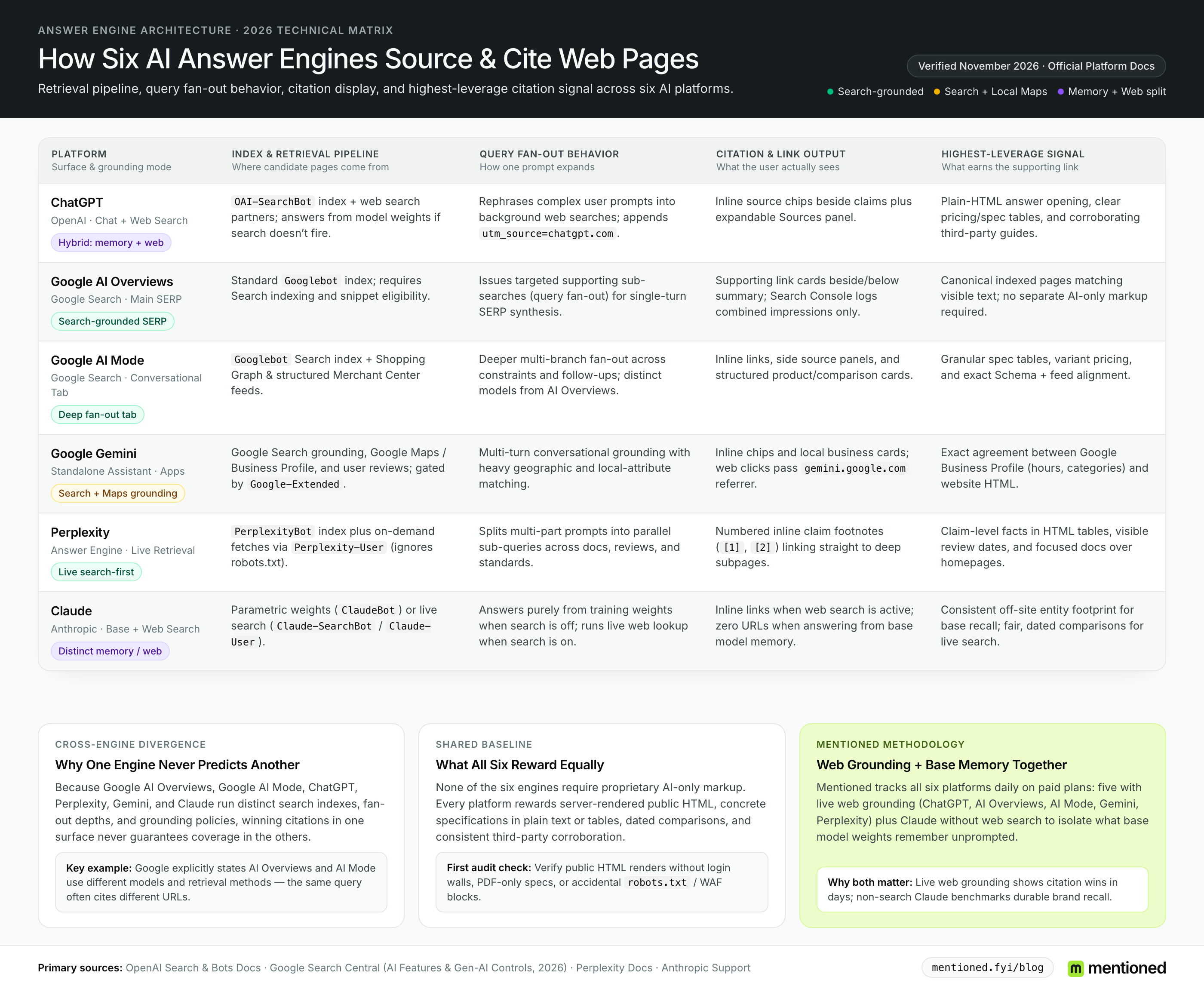
Reference ChartVerified November 2026 from official OpenAI, Google Search Central, Perplexity, and Anthropic platform documentation. Free to save or cite with attribution.
Suppose a family visiting Thessaloniki asks Gemini for a paediatric dental clinic open on Saturday mornings with English-speaking staff. Gemini responds with three clinics, summarizing each location’s neighbourhood, opening hours, review highlights, and website link. If your clinic’s website announces Saturday hours, but your Google Business Profile still marks Saturday as closed—or your robots.txt blocks Google-Extended while nearby competitors leave it open—Gemini can either skip your clinic or quote the wrong schedule.
For local and multi-location businesses, Gemini sits right at the intersection of Google Search, Google Maps, customer reviews, and your own website. Getting recommended accurately starts with making sure those public signals tell the same story.
Where Gemini Pulls Business and Local Facts
Google does not publish an exact ranking formula for Gemini recommendations, and answers shift based on phrasing, language, conversation history, and user location. In practice, however, Gemini grounds business and local answers in four overlapping groups of public evidence:
- Google Business Profile and Maps facts. For local intent—clinics, hotels, restaurants, trades, law firms, retail stores—Gemini frequently draws on structured business facts tied to Google Maps: official name, primary and secondary categories, verified address or service area, regular and holiday hours, phone number, booking links, and location attributes. Follow Google Business Profile guidelines strictly rather than stuffing extra keywords into your business name.
- Google Search grounding from public web pages. Beyond basic listing fields, buyers ask constraint-heavy questions (“wheelchair-accessible entrance,” “late airport check-in,” “emergency same-day appointments,” “vegan tasting menu”). Your website’s location and service pages supply the granular details that a short map profile rarely holds.
- Customer reviews and sentiment cues. Genuine reviews add context that static profiles cannot capture—wait times, staff languages, parking reality, or reliability. As noted in Google’s guide to local results, local visibility reflects relevance, distance, and prominence, and detailed public feedback helps users and systems match nuanced requirements.
- Reputable third-party listings and local coverage. Established booking platforms, sector directories, medical or legal registries, chambers of commerce, and local press corroborate your location and specialties—or introduce outdated facts if left unmaintained.
For a deeper operational walkthrough of keeping branch details consistent across search and AI assistants, read our guide on how to check local visibility in AI search.
What Google-Extended Actually Controls
Many site owners block Google-Extended in robots.txt assuming it only stops model training, then wonder why Gemini Apps stop grounding answers in their service pages. Google’s Google-Extended documentation spells out the exact scope clearly:
Google-Extendedis a product token, not a separate crawler. You will not see a user-agent namedGoogle-Extendedin your server access logs; Google applies the directive to content fetched by its existing crawlers.- What it controls: Disallowing
Google-Extendedopts your content out of covered future foundation-model training and out of grounding answers in Gemini Apps (as well as the Vertex AI API for Gemini). - What it does not control: Disallowing
Google-Extendedhas no effect on Google Search indexing, rankings, Google Maps listings, or eligibility in Google AI Overviews and AI Mode (which are governed separately byGooglebotand Search Console’s Search generative AI setting).
If your business wants Gemini Apps to read and cite your current menu, pricing page, service coverage, or FAQs when grounding a recommendation, check that your robots.txt does not carry an unintended blanket block on Google-Extended:
# Blocks Gemini Apps grounding and covered training
# (Does NOT block Google Search or AI Overviews)
User-agent: Google-Extended
Disallow: /
Inspect your live rules across both your root domain and any booking or support subdomains using the AI crawler checker, and review our full robots.txt guide for AI crawlers before editing existing directives.
Sample Local and Brand Verification Table for Gemini
Before writing new blog posts or tweaking headings, audit the factual inconsistencies that actually cause Gemini to omit or misdescribe a business. The table below is a sample verification worksheet for a hypothetical multi-service clinic or hospitality business:
| Signal to Verify | Where to Check | Common Conflict | Practical Fix |
|---|---|---|---|
| Business Name and Categories | Website header/footer, Google Business Profile, sector directories | Old trading name on a major directory; broad category misses core specialty | Standardize the real-world name and choose the most specific primary category. |
| Hours and Holiday Exceptions | Branch page, Google Business Profile, booking widget | Website lists Saturday hours, but GBP still marks Saturday closed | Update GBP regular and special hours; assign one staff member to seasonal changes. |
| Buyer Constraints | Service and location pages in plain HTML | Languages spoken, parking, or accessibility listed only inside an uploaded flyer image | Publish constraints as readable text near the top of the branch page. |
| Review Themes and Corrections | Google Maps reviews and niche review platforms | Outdated two-year-old review mentions cash-only payment after card payments launched | Reply concisely with current facts and state accepted payment methods clearly on-site. |
| Grounding Crawl Access | Live robots.txt on main domain and booking subdomain |
Legacy Disallow: / rule for Google-Extended blocks Gemini Apps grounding |
Review policy intentionally with stakeholders and verify with the AI crawler checker. |
If you manage several branches or client locations, download and adapt our local AI visibility checklist so every branch is audited against the same factual baseline.
Test Local Gemini Prompts Without Blind Spots
Local Gemini recommendations change dramatically depending on how a buyer phrases the constraint and where they appear to be located. When running manual checks:
- Separate unaided discovery from branded checks. Ask “paediatric dentist open Saturday in Thessaloniki” first before asking “is [Clinic Name] open on Saturdays?” Only the first tests whether Gemini surfaces you to new customers.
- Specify concrete buyer constraints. Include the real deciding factors—neighbourhood, opening window, language, family rooms, emergency availability, or budget tier—rather than generic keywords.
- Test in every language your customers use. Hotels, clinics, restaurants, and regional services in tourist or international markets often get different Gemini recommendations in English versus the local language.
- Record location, date, answer text, and cited links. A single run is a snapshot, not a permanent ranking.
Tracking Gemini Alongside Google Search Surfaces
Keeping consistent records across Gemini, Google AI Overviews, and Google AI Mode quickly turns into spreadsheet work once you track multiple services, cities, or languages—especially because each Google surface can cite different pages for the exact same question.
Mentioned tracks Gemini daily as a dedicated platform alongside Google AI Overviews, Google AI Mode, ChatGPT, Perplexity, and Claude across 60+ countries and 30+ languages on every paid plan. Starter (€29/month, excluding VAT) covers 1 brand, 25 tracked questions, and 2 markets; Growth (€79/month) expands to 3 brands, 100 questions, and 5 markets; and Agency (€199/month) supports 10 brands, 300 questions, and 15 markets with shareable view-only client dashboards and scheduled email reports. If you want to try prompt tracking on a smaller scope first, the Free plan tracks 1 brand and 5 questions weekly on ChatGPT with no card required. See full details on the Mentioned pricing page.
A Four-Step Local Gemini Readiness Checklist
Work through these four steps for your highest-value location or service line before expanding to broader content campaigns:
- Audit Google Business Profile against your website. Confirm name, categories, address or service area, regular and holiday hours, phone number, and direct booking URL match cleanly.
- Make each location page answer real buyer constraints in plain HTML. Put neighbourhood directions, accessibility, languages, policies, and current services in readable text—not embedded images or PDFs.
- Check
Google-Extendedintentionally. Confirm yourrobots.txtreflects your actual policy for Gemini Apps grounding, not an accidental carry-over rule. - Review a fixed set of local prompts on a schedule. Track mentions, factual accuracy, and cited sources in the exact languages and markets your customers search from, and fix recurring factual errors at their source.
Frequently Asked Questions
Does Blocking Google-Extended Hide My Business From Google Search?
No. Google documents that Google-Extended does not affect Google Search indexing, rankings, or AI Overviews. It controls Gemini Apps grounding and covered model training separately.
Why Did Gemini Show Old Opening Hours for My Store?
Gemini draws on Google Business Profile facts, map listings, your website, and third-party directories. If one public listing still carries old hours or misses seasonal holiday hours, that conflicting detail can surface in an answer.
Should I Track Gemini Separately From Google AI Overviews?
Yes. Gemini is a standalone conversational assistant with separate grounding controls and multi-turn behavior, whereas AI Overviews sit inside Google Search. Recommended businesses and cited links frequently differ.
Free Local Business AI Visibility Checklist (Printable)
Use our one-page door-to-booking audit checklist for hotels, restaurants, clinics, and local services — and subscribe for new guides and updates.
Check Your AI Visibility
Start free with 5 ChatGPT questions weekly in Mentioned, or test which AI crawlers your website allows.